
Show Notes
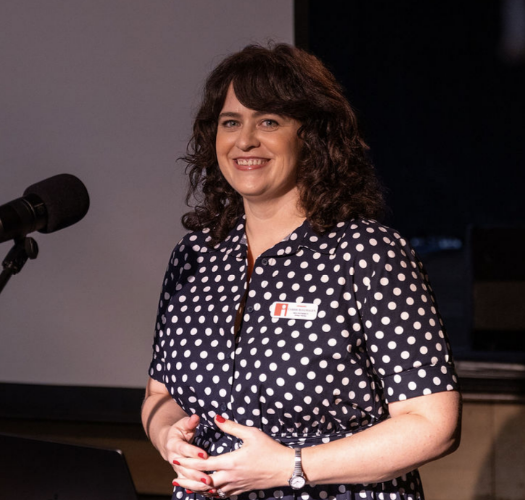
Hiring a virtual assistant for your small business might be the move you’ve been avoiding for too long. In this episode of The Localist, recorded live at Localist Lab in Birmingham, host Carrie Rollwagen takes the speaker seat to walk a live audience through what part-time help actually looks like.
Carrie shares the calendar moment that finally pushed her to hire a virtual assistant for her small business. She explains the difference between a VA and a full-time employee, where to find a good VA, how much to budget, and what to put in writing before anyone starts work. She walks through the documents she built for her assistant, the tools they share, and the kinds of work she hands off and the kinds she keeps for herself.
The second half of the talk shifts to AI tools. Carrie covers where AI works well as a personal assistant and where it falls short. She shares the AI tools she uses to build slide decks, transcribe meetings, organize her chaotic desktop, turn one podcast into a dozen short reels, and even plan trips. She also explains why a virtual assistant and AI tools work best together and how a good VA who uses AI well can make five hours a week feel like full-time help.
Whether you have been thinking about hiring a virtual assistant for your small business or trying to figure out where AI tools fit in your workflow, this conversation is full of practical and honest guidance.
Virtual Assistant Small Business Topics Covered in This Episode
- Why Carrie finally hired a virtual assistant for her small business and how she knew it was time
- The difference between a virtual assistant and a full-time employee
- Where to find a virtual assistant: Virtual Savvy, Time Tailored, and what to look for
- How much a virtual assistant costs and how many hours to start with
- Why setting communication expectations before you hire matters so much
- What to put in writing before your VA starts work
- The documents Carrie built for her VA and why they made onboarding easier
- How to use a password manager to keep your client information safe
- Where to draw the line on personal tasks for a work VA
- Where AI tools work well as a personal assistant and where they don’t
- How Carrie uses AI for slide decks, voice memos, desktop organization, and reels
- How a virtual assistant who uses AI can make five hours feel like full-time
Mentioned in This Episode
- Virtual Savvy
- Time Tailored
- OnePass (password manager)
- LastPass (password manager)
- Calendly
- Otter.ai (voice memo transcription)
- Carrie’s Turn One Post into Ten talk
- Ohm Jiu Jitsu (Russell Marbut)
- Alabama Twisters
Follow Carrie Rollwagen
Listen to The Localist on Spotify & Apple Podcasts
Thanks to Our Sponsor, Infomedia
The Localist is sponsored by Infomedia. They are a Birmingham-based web and digital marketing company. They help small businesses grow online. Contact Infomedia.
Join Us at Localist Lab
Localist Lab is a free event series for small business owners. It meets on the third Thursday of most months at Saturn in Avondale. Each session covers marketing tips you can use right away. Free tacos and coffee, too. See upcoming events.
Subscribe to Carrie’s Newsletter
Want more small business tips from Carrie? Sign up for her newsletter and get insights, resources and updates sent straight to your inbox. Sign up here.
FULL EPISODE TRANSCRIPT
Below is the full transcript of this episode of The Localist, recorded live at Localist Lab.
Carrie (00:12): Hi, I’m Carrie Rollwagen, host of the Localist. What you’re about to hear is a live recording from one of our Localist Lab events. This is when we bring in experts to talk about practical insights on marketing for small businesses. This session was recorded in front of a live audience, so you may hear some room noise and some shuffling around during the Q and A, but hopefully that just makes you feel more like you are actually there. For more background on the speaker, or to view slides from the event, check out our show notes, or you can also grab a ticket there to our next event. I hope you enjoy this conversation.
Carrie: I’m Carrie Rollwagen. I’m host of the Localist podcast and author of the Localist book. And on the Localist podcast, we profile small business owners and hear their stories. And here at Localist Lab we kind of dig into specific topics and we bring in people who can really speak to those topics to help small businesses.
Carrie: We are sponsored by the really Lovoy family of companies, so that’s Infomedia, Uptick Marketing, Infomedia Studios, and Tempo. Between all of our companies, we really service digital strategy needs, so whether or not you have a large company and want to build a really big, robust website to do a lot of things, or you have a startup and you need a quick website, or you have digital marketing needs for really any size company or content, video photography, anything like that, we help you out. So, if you see anybody with the Infomedia name tag or the Uptick name tag afterward, just ask how we can maybe help and work together. We are also sponsored by Lady Bird Taco. I know that’s why the staff comes.
Carrie: So today’s topic is a practical guide to part-time help, and we’re going to be talking about virtual assistants and AI tools, and I’m the speaker today, so this is a little weird for me, because usually I introduce somebody and I get to sit down, but not today.
Carrie: We decided to do this topic actually because you guys asked us for it. So last year we had a different event series, and we talked about how we got through the gap when our marketing manager left, and we still needed to post on social media, and one of the ways we did that was we hired a VA for social media. Five people came up to me after the talk and said, can you please do a talk on this, because I’ve heard about it and have no idea how to do it. So we do listen when you have ideas.
Carrie: Another reason that I found a VA in the first place is really just because I was personally overwhelmed. I’m a VP at Infomedia. I also consult for our sister companies. I also do a lot of speaking events, like this one. Then there’s the podcast, there’s the event. My husband owns a business, owns Jiu Jitsu. And then last year we actually bought into a professional sports company, the Alabama Twisters Jiu Jitsu group. All of these are really fun. Obviously I have an issue with saying no to things, but it was just really stacking up and getting to be too much.
Carrie: The flashpoint for me was really my calendar. My calendar was just this incredible work of genius. At any moment 75 different people could be booking stuff on my calendar, so I would arrange it perfectly, and then every week one or two people would say, hey, I can’t make it today, can you give me some other options. When that happened, every nerve in my body would just feel like fried. Of course, I can give you more options, but that’s not the proper way to respond. So I was really overreacting inside to a pretty normal request. For me that flashpoint was the calendar. For you, it might be email, like you might just be buried under that. It might be that you can’t get through the approvals you need to get. There are a lot of different reasons.
Carrie: I needed help, but we weren’t going to hire a full-time assistant for me. It’s not the Devil Wears Prada. There’s probably enough for the assistant to do, but we have other priorities at work, so we hired a virtual assistant. This is Hannah, this is my assistant. She is a real person. There’s a bit of a misnomer with the term virtual assistant. People think they’re bots, and there are AI assistant bots, which we’ll talk about, but when we’re talking about virtual assistants, we’re talking about a real person.
Carrie: Hannah has three kids, she was a former business owner, which is very helpful in the work she does with me, and she’s really helped out so much that at Infomedia and Uptick we’ve brought on additional virtual assistants to help other people who are pretty overwhelmed, but who we can’t really hire a full-time person for. Between the two companies, we use virtual assistants for a few different things: executive or personal assistance, which is what Hannah does for me. We also have a VA who does our social media posting, we have a VA who does our podcast management, that’s also Hannah actually, and then we also use some light bookkeeping help and some help with sales. So you can have somebody who is a generalist, or you can say, I have a problem in this specific area, and probably get somebody who can help you out there.
Carrie: Why would you hire a virtual assistant instead of a full-time hire? If you have enough work for a full-time hire, that is the better way to go. I don’t think we should be using VAs as just, well, I don’t feel like paying for a full salary. If you have that much work, you probably need to hire a person. But a lot of times we don’t have the work or we don’t have the budget, so VAs are just fewer hours altogether. A lot of VAs start at five hours a week, so even a part-time person is probably going to be 20 hours a week. A VA is a little bit easier to bring on.
Carrie: Also, they are contract and not full time, so if you’ve ever done anything with payroll, you know that a 1099 staff member is easier than a W-2, just a lot more paperwork and onboarding. There’s also just a lower commitment level. I really love Hannah, and I hope that she stays with us for a long time, but if we were needing to cut her, I’m not cutting her entire source of income, because she has four other clients. Whereas if you bring on somebody full time, and you don’t know if you have the budget yet, in three months it’s a nightmare for that person and for you to be able to say, we have to cut you because I didn’t plan well.
Carrie: Also, virtual assistants come, if you hire a good VA, already going to know things like email management, calendar management, just how to act professional when you’re managing somebody else’s work life. One of the things we ran into before is I would talk to people who said, we think you need a VA, and they’d say, great, I know a really nice person from my neighborhood. You might have a nice person from your neighborhood who’s also certified to be a VA, but if you don’t, then you onboard that person, and you have to teach them, welcome to Gmail. That’s a lot to be teaching somebody, and if you’re already at the point where you’re overwhelmed, you probably don’t have that. Hannah was able to come in, know these systems already, and of course we tweak things because we do things a little bit differently, but that was so much easier from the beginning.
Carrie: How do you actually find a VA? This was what stopped me from doing this for a really long time. I knew VAs were a thing, I knew other people use them, but I didn’t know how to hire or how much it cost. The services we use I’m going to link in my newsletter. The service we use is called Virtual Savvy. They’re not sponsoring us or anything. It’s actually a business that trains people to be a virtual assistant, so they’re not taking a cut of anything if you hire through them, they just get paid by people learning how to be a VA from them, and then they have a job board that only people trained by them can see.
Carrie: A lot of people also hire VAs offshore, there’s a huge VA movement in the Philippines. There are pros and cons to those. For our companies, it just made more sense to hire somebody in the States. We also got connected with a smaller group called Time Tailored, and they actually all trained in the Virtual Savvy ecosystem, but it’s a smaller thing, and it’s nice for us to be connected to that company, because when we need to hire, we can either post in the large job board, or reach out to Aaron, who owns Time Tailored, and say, hey, we need somebody to do this.
Carrie: When you’re budgeting for a VA, you want to make sure you have at least five hours a week of work. Most VAs charge 35 to 40 dollars an hour. Obviously you’re going to pay more for the same kind of work than if you have a full-time person. That’s true of almost any freelancer. They’re going to get paid more because they’re not working as many hours, and they’re not getting health insurance. If you want somebody to specialize in HubSpot or something like that, you’re probably going to go more toward the top of that range.
Carrie: After you get those resumes or portfolios, you really want to make expectations clear, even before you hire the person. This is something that is so critical with a virtual assistant, or really with any assistant, and also with AI. Make your communication preferences clear from the beginning. I told Hannah, I try not to be a micromanager with the rest of my staff. I’m not sure I succeed, but I try not to. But with my assistant, who’s representing me, I am pretty picky, so I told her that from the beginning. Also, whenever I communicate with you, I don’t have time every single time I slack you to be really nice about it, I might just be very direct. I was telling her before, this is how I prefer to communicate.
Carrie: It’s also helpful to tell them the format. A lot of small business owners like to communicate over text message. I detest it, but a lot of people are moving around, going all over the place. If that’s the way you want to communicate, you need to tell the VA before you hire them and see if they’re willing to do that. For me, I told Hannah, I want to communicate over Slack, and I’m going to slack you things in the moment to get them out of my brain. I know you’re working five hours, you’re not working all the time. When I slack you, it doesn’t mean get on this right now, it just means now it’s out of my brain, and you’ll get to it when you’re back working.
Carrie: Beyond talking through them, have an agreement also. Obviously for the size of Infomedia and Uptick, we have a contract, because that’s the best thing to do, but even if you’re a solopreneur or freelancer, at least get things in writing, so you have some kind of agreement. The things I would talk about there are how the VA is going to track their hours, how they’re going to invoice. One of the benefits of hiring people who are already trained is that they all had an answer for this already.
Carrie: Also, make sure that they have a plan for protecting your confidential information. At our companies, we don’t have our VAs working on client work. We may have them inviting a client to a meeting, but they’re not given access to our client work, so they aren’t going to have a lot of that information. But we did go out and say, if I have you set up a meeting with a client, I don’t want the VA going behind me to that client and saying, hey, do you need a VA. We went ahead and said that at the beginning. It seems obvious, but I figured it was easier at the beginning than it happening and having to go backwards.
Carrie: One thing Hannah and I do is that she writes up SOPs, or standard operating procedures, for the things that she does for me, because I was really worried about that. Am I going to hand everything over to you, and then you’re going to leave, and then I’m worse off than I was before? She kind of writes a little playbook for the next person in case she does leave.
Carrie: Then you want to get your VA connected to everything that they need to be within your systems. At our companies, we typically will give them a company email. You don’t have to do that. We think sometimes because they are inviting clients to meetings, it looks a little more professional, and then it’s easier for them to access documents within our Google workspace. I would strongly recommend getting a password manager. OnePass is what we use at Infomedia. LastPass is also a good one. This way you can give your VA all the passwords they need. The first week is really annoying to get two factor multiplied by however many accounts you have, but it is less annoying if you can go through a password manager. It’s also way more secure.
Carrie: It also means that you can cut off access to certain things. At Infomedia we have a vault in our OnePass where we have any passwords our VAs might need to access, like my website or the Localist, but our client accounts are not in that vault, so they don’t have access to all of our client information. Setting up something like this is not that expensive, and I think it really is helpful. Also, if your VA leaves, if you are controlling the email and the password manager, you can cut off that access. Of course, that’s not perfect. They can save the passwords on their own. Those things you shouldn’t completely rely on, but it does make it a little bit easier, a little bit safer.
Carrie: There were a few documents that I created for Hannah that you absolutely don’t have to create, but this really did help us. They are on the newsletter as well, as examples. I named them silly things, but the first document was called the World of Carrie document. This was just a rundown of all the different things I am working on, so any business I’m consulting with, here’s a little bit about that business. I put my mission statement, I put what I want to do long term, because writing is part of what I do now, but it’s also part of my long-term strategy, so she needs to know that. If it’s, why are you prioritizing doing a speaking event at the library? Well, this makes a little more sense when she sees how I’m trying to build my career.
Carrie: I also made an important people document. I just listed not everyone on staff, but the people I communicate with the most, and then also friends and family. This was just for me, so I didn’t have to explain. Russell is my husband, and Russell works at Infomedia, and Russell owns Ohm Jiu Jitsu, and Russell owns Alabama Twisters, and they’re not different people. One of the things that we connect on is doing too many things. This is helpful, so that she didn’t have to ask me a lot of this.
Carrie: Another thing she asked me to create, which has been helpful, is a list of lunch and coffee places where she can book meetings without asking me. I called it Other Places I’ll Go, because I like books. I got very detailed because I’m a very controlling and anxious person, but I put, this place is within 10 minutes of driving of work, or this place is across the street from work, and the same with home, and linked the restaurants. She lives in Arkansas, she doesn’t live here, so she doesn’t know this stuff. I can just say, I want to meet them for coffee, and because she knows my calendar, she knows where I’m coming from, so she can set something up that makes sense for me.
Carrie: What does Hannah actually do for me? She does a lot of Localist work, so she works on the podcast primarily, she invites and schedules the guests, she does the show notes, she posts to YouTube, she does a lot of behind the scenes. She also asks a million questions. Paul, one of our engineers, saw me in the hallway the other day, and he said, how many guests do we have on the podcast this afternoon? And I said, I don’t know, ask Hannah. Typically I’ve worked on that podcast, but my schedule is kind of bananas, so I don’t remember. Hannah knows, and it also helps the staff because they can ask her those questions even if I’m not available.
Carrie: For Infomedia, mostly what she does is she’ll take meeting notes that I have, either with her or with staff, and turn those into documents or deliverables. I definitely review those things, but it’s helpful to not have to create them in the first place. She also manages my calendar. I do a lot with Google Tasks, that’s how I keep my to-do list, so she can also add tasks for me. Before, when she scheduled this event, she knew I was going to be speaking. She scheduled something a month before that said, you need to do a draft of your outline. Then two weeks before, you need to do these slides, and a week before, have the creative director review the slides. She already knows for tasks that happen all the time that she needs to add some tasks.
Carrie: She also does some personal stuff. She’s booked a hotel for my mom, she books my doctor’s appointments and my hair appointments, because those are part of the calendar, and it’s way easier to have her do it than me. For my birthday party, I planned it, but I did connect her with the venue manager, and I was like, can you get all the details that we need, and she actually sent the invitations out. This is something I would also talk about beforehand, and make sure that your VA is willing to do some of this, what are the lines there. If someone else is paying for your VA, also talk to them. I talked to my boss, and was like, this is how much time I can have her do personal stuff. I can’t have all of her time.
Carrie: I felt like this talk would be incomplete in this current time without talking about AI assistants as well. I can’t tell you how to build an AI bot, partially because it’s a little creepy, but also just because I have Hannah, so I haven’t done that. But I do use AI in a lot of assistant-type of tasks, so I wanted to address that.
Carrie: If you want to use AI for your assistant, how would that work? When it comes to calendaring, I think it’s a little bit tricky, and it depends a lot on what you do. If you have a really reactive calendar, which is the best word I can think of to describe mine, it’s reactive, it’s changing all of the time. I think AI may not be the best thing for you. But if you have a pretty standard task list, like say you’re an engineer, and you know I need to get this done in one day, and I have control over most of my time, then it can absolutely help you sort those tasks. I did a lot of research on this, because I thought maybe I’m just being silly about this, but a lot of the things I found were, no, AI isn’t the best for a business owner type of schedule that’s changing all the time. It’s typically better for people whose schedules are a little bit more static. One thing you may try is using something like Calendly. Calendly is not an AI. I’m sure they have used AI somehow, because there’s no piece of software that doesn’t, but really it is more just something that you can give somebody a block of time that they can block within their schedule.
Carrie: I wanted to talk about some of the things that I do with AI, and you can extrapolate how you could use this as your assistant. I won’t spend too much time on creating boring documents, because I think we all know that AI can do this, but I’m not writing job descriptions myself anymore. I wasn’t in the first place, I was just googling five of them and putting the good things together. Things that I wasn’t putting creative work into before, now I will use AI to create that kind of thing.
Carrie: It also turns scribbles and verbal conversations into documents. This is the first iteration of this talk. I’m ancient, so I write things on index cards, and then I can move them around. I like the tactile version, but AI has finally advanced to the point that it understands my handwriting. Two years ago, it definitely did not. I just took this picture, uploaded it into Claude, and was like, turn this into text, and then I can send it to Hannah, who built the slide deck. AI can also build decks for you. I’ve had mixed results with that, so try it if you want to.
Carrie: I also have it convert a lot of text conversations. I’ll just record a voice memo. I use a service called Otter.ai that transcribes things, and that has an app on your phone that you can just speak into, and it’ll have a transcription. I like it, but you could also just record a voice memo on your phone and transcribe it any way that you want. Sometimes we can record meetings, but a lot of times I have in-person meetings with people, so in that case I may record part of it as a voice memo, and then transcribe it, then turn it into a document or deliverables. I do have a caveat: if you’re recording a conversation, you should always tell somebody, and whether or not it’s illegal, I don’t think matters. You should tell somebody.
Carrie: I’ve also used it to organize my desktop. How you could extrapolate this is any digital chaos. You would need an agent, so Claude Cowork is what I use, but you can use different things. I had the kind of desktop that people were always freaked out by when they saw it in a meeting. I actually just had a folder on my desktop that said Relax Paul because Paul, our engineer, would get really stressed out. Before I had him see my computer, I just dragged everything into that folder. That was my system before, but I had Cowork go and actually organize things into files. The desktop files, I didn’t have it rename or change, I just had it organize. My screenshots, though, I did have it actually rename, so I named them according to the topic. I gave it some topics, and it also found some topics to suggest. I said, find a couple keywords in the screenshot. Did it do it perfectly? Absolutely not. But I couldn’t find screenshots before anyway. Now I can find them a little better, and the date is still in there.
Carrie: I can also use AI to turn one podcast into dozens of different clips. Our team usually cuts a reel for me to promote the podcast, but they don’t have time to go through the entire thing, so they’ll usually do one really good reel, but I want to promote it more, so I can put the whole video into a system that cuts different clips. We’re still experimenting with this, and the humans who cut these things definitely do a better job. This is just kind of like it gives me an idea of what might be good, and I have to do a lot of work on it after that, but it’s still getting me to that point a little faster.
Carrie: Not everybody here has a podcast, probably, but if you don’t, you can still turn one thing into a lot of different things using AI. You could turn a blog post into a bunch of different social media posts, or if you’re doing a speaking event, or a webinar, you can turn it into additional content. I actually have a whole talk on this called Turn One Post into Ten, which is not actually talking about AI, it’s talking about how to do this as a person, but you can also use some of those tips for how to use AI. I would recommend either watching this or doing a little bit of research, because when people just take a blog post, don’t prompt it, don’t change their brand voice, and turn it into a bunch of stuff, it just sounds like AI, and it’s not resonating with people anyway. So I definitely wouldn’t say just do that and hands off, and just post it, but there are certain ways that you can make it not seem gross.
Carrie: I use it to optimize my life. My life is optimal, don’t worry about it. These are some personal things, personal assistant stuff that I’ve done. I create packing lists for trips. I’m a very persnickety traveler, so I already had lists, but this will let me say, I’m going for two days or I’m going for 10 days, and it adjusts the list. It can brainstorm trip itineraries. I say brainstorm instead of, some people are like, AI is my travel agent, but when I’ve double-checked a lot of this stuff, it’s close. So I think it’s a good starting point, but I would definitely check that. That’s correct for all of AI. I’ve used it for some light meal planning, party planning ideas, and then I used it to romanticize my workout, which is pretty lame, but it’s really worked out well. I was just like, I hate this. When you’re doing any of these things, just remember, prompt it really heavily, and really drill down in your pain points. If I were telling a trainer this is why I don’t want to work out, I would be so ashamed to say, I’m just really lazy, I’m tired, and I’d rather be watching TV. That’s not what I would probably tell a person, but I would tell the AI that.
Carrie: This is a hack that is creepy, so use it at your own risk, but I will tell the AI, this is my Myers-Briggs type, this is my Enneagram, this is my disc, create a plan for me that works with my personality, and it’s pretty good at that, because it’s just aggregating content, and there are a million blogs on there about how an INTJ works out. So you typically get better results, but then the robots know about your personality, so pros and cons.
Carrie: VA or AI, or both? What would work best for you? Both is probably going to be your answer if you go with the VA. Hannah uses AI a lot. She makes her five hours a week go really far. It actually feels like she’s working for me all of the time, and part of the reason is that she’s using AI to do part of her job. She’ll record our meetings, turn them into deliverables, she’ll fix what it got wrong, those kinds of things, but she’s not just handwriting the notes all of the time. Things like generating show notes, she uses AI pretty heavily.
Carrie: The pros of using a VA: they can respond to quick, incomplete communication. If you saw half the Slacks that I sent to Hannah, you’d be like, how in the world did she figure out what she meant by that? Some of that is because she’s been a business owner before, so she kind of gets what I want, and some of it’s just working together. VAs are also really good for communicating with large teams, because I communicate pretty differently with my boss versus a department head versus part of the team. I try to be much nicer to the team and as mean as possible to my boss, but I am more short with everyone. We just have a different communication style. Could you program an AI to do that? Sure, but it would take me a long time, and I don’t want to. She is also good at handling changing dynamics, so I’m not having to always re-prompt and re-explain, because my life changes a lot.
Carrie: Some of the cons are that it just may not be in your budget to hire a VA, so that is probably going to be a big part of it. They could leave, like an AI probably won’t, depending on what happens in the Terminator-style future. You also need to act like a decent person when you’re talking to a person. If you really are so exhausted that you can’t be kind at all, this may not be the best thing for you.
Carrie: AI pros: AI is good at organizing a ton of data. I would never have paid a human to go into my screenshots and look at them and find keywords and name them, it was not worth that. AI can also be good at organizing and calendaring if you have a very set schedule already, and obviously it’s always available. If you’re working at 3 o’clock in the morning, it can also be working at 3 o’clock in the morning. It does struggle some when requests are unclear. The more you work with it, the less it will do that. I asked Hannah, what does her AI struggle with the most with me, and she was like, it doesn’t understand sarcasm. When I say, oh yeah, let’s totally give that project to that person, it totally gives that project to that person. Apparently I use it enough that it was worth mentioning.
Carrie: The human variables of the different people you interact with can be pretty complex. When it comes to AI, the quality of the output you get from it is going to be equal to the quality of the input that you give it. If you don’t have a ton of time to tell it everything that you’re doing, the output won’t be as good, whereas a human, especially a VA who’s trained for this, can help you through that. The right answer is really just what makes the most sense for you.
Speaker 1 (34:57): How would you describe the difference between a freelancer and a VA?
Carrie: A VA is a freelancer, so in some ways it’s the same thing, but it would just be a freelancer who specializes in being an assistant. If you use freelancers for your business, you’re kind of set up well already, because you probably have a system for how you pay freelancers, so you can fold them into that. It gets a little murky when you’re talking about, for example, a social media VA. Marissa, who does our social, she could easily just say, I’m a freelance social media manager, and that would also be true. She does admin tasks for some of her other clients, not for us. There isn’t much of a difference, it’s kind of a terminology thing.
Luke: How do you trust your VA to respond to people in your email in the way that you find acceptable?
Carrie: The short answer for me is, I don’t. Hannah doesn’t send emails from my email, but that is because that wasn’t a huge pain point for me, so that’s not something we really trained on. She will definitely send emails from her email to people I work with, and I didn’t get really granular on telling her what to do there, just because I think they can see, this is Hannah, and normally she’s emailing people internally. I am a little more careful when she’s emailing people externally, and usually I’ll write a template for that email. How I would do it is using templates to say, this is what I want you to say, and that is very helpful. It’s a lot easier to go in saying, here are four examples of emails I write all the time, and this is what I want included. That is easier than saying, I hate how you’re doing this.
Carrie: We do have people who their VA is in their email, and I think that what we do there is, if the email is really a boilerplate email, like if it’s just saying, I got this, I’m on it, then the VA knows they can go ahead and respond to that. If they scheduled it, they have it in the thing, and it’s nothing really personal, they respond to it. But if it’s something that is more detailed, they just flag it, and the person who is managing that email goes in and does it themselves.
Carrie (37:41): This is kind of a good way to see, do I need a person in this role? Our marketing manager, we’re working that out, she’s a five-hour-a-week VA. That is not equal to a marketing manager, and going into that and acting like they should be is not going to help your company, it’s not going to help that person. You can scale it back and then see, can I live with this? It is also kind of a way that you can test out, are we ready for a full-time hire? If you’re having to add more and more hours to your VA, it could be time to say, actually we need to bring on a person. But it’s easier to do that when you know we have consistently had this work.
Carrie: Thank you very much. You can also talk to me about your podcast. If you don’t have a podcast, that’s the best time to talk. If you’re interested in doing a podcast for you or your business, or you just want to come into our studio and record some clips for social, we do that. This is our studio. You can record right where we record the Localist, so if you’re interested in that, talk to me or anybody with the Infomedia name tag.
Carrie: I also hope you will become a subscriber to the Localist podcast. We’re going to share this event in a couple of weeks on the podcast, so if there’s somebody that you think could use it, a coworker, somebody who has a small business, you can find it to share there. Next month I’m really excited about our topic. We’re going to be talking about writing with AI. Everybody is trying to write with AI, and then it comes across really bad. Somebody said to me yesterday, I just don’t like AI writing, and I was like, I don’t either, but you can use AI for things like organization and teaching AI your brand voice. It depends. I write the show notes for the Localist with AI, but those are not creative output, it’s just what happened. But I’m not going to write my newsletter with AI, because I’m a writer, and it’s important to me to keep those distinct. Janna is going to talk about really practical ways in your business writing, how to organize it, how to use it without it just taking over your whole brand voice. It’s going to be the third Thursday of next month, right back here. Thanks again to everyone, all these companies for having us.
Carrie (40:48): Thank you so much for listening to this Localist Lab session. If you’d like tickets to the event, check out the show notes. The tickets are free, and we would love to see you there. And as always, whether you’re buying from a local business or running one, remember that what you do makes our community stronger every day.